

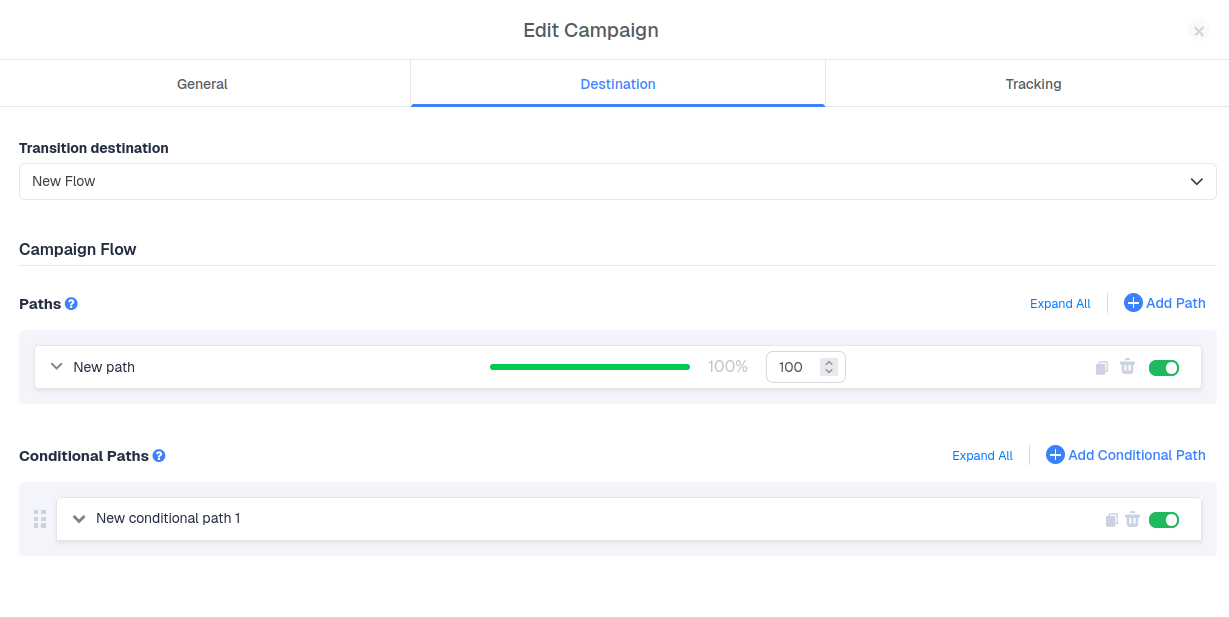
Default Paths
A default path is required in every Flow. It acts as the fallback: any visit that doesn’t match a conditional path is sent here. When there are multiple default paths, traffic is split between them according to their weights.Conditional Paths
A conditional path allows traffic to pass only if it meets specific conditions. For example, you can create a conditional path for all visits where Device Type = Tablet.How Conditional Paths Work
Understanding the evaluation order is key to building Flows that route traffic the way you expect.Conditional paths are checked from top to bottom
When a visit arrives, ClickFlare checks your conditional paths in the order they appear in the Flow, starting from the top.- The visit is compared against the conditions of the first conditional path.
- If the conditions are met, the visit is redirected through that path and evaluation stops. No other conditional paths are checked.
- If the conditions are not met, ClickFlare moves on to the next conditional path and checks it.
- This continues down the list until a match is found.
- If the visit matches none of the conditional paths, it is sent to the default path(s).
First match wins. A visit can only follow one path. Even if it would also meet the conditions of a path further down the list, it will always go to the first path it matches.
Example
Imagine a Flow with the following setup:
Here is where different visits end up:
- Desktop visit from the United States → matches Path A → sent to Path A.
- Mobile visit from Germany → doesn’t match A, matches B → sent to Path B.
- Mobile visit from the United States → matches A first → sent to Path A. It also meets the conditions of B and C, but those are never checked.
- Desktop visit from Germany → matches none → sent to the Default Path.
Ordering tips
- Put the most specific paths at the top. In the example above, moving Path C to position 1 would let US mobile visits reach it, while other US visits would still fall through to Path A.
- Put broader paths lower down. Wide conditions (e.g. a single country) placed high in the list will “swallow” traffic intended for narrower paths below them.
- A default path is required, as it serves as the fallback funnel when none of the conditional path conditions are met.
- Review the order after adding a new path. A new conditional path can change where existing traffic goes if it’s placed above other paths with overlapping conditions.
AND vs. OR inside a single path
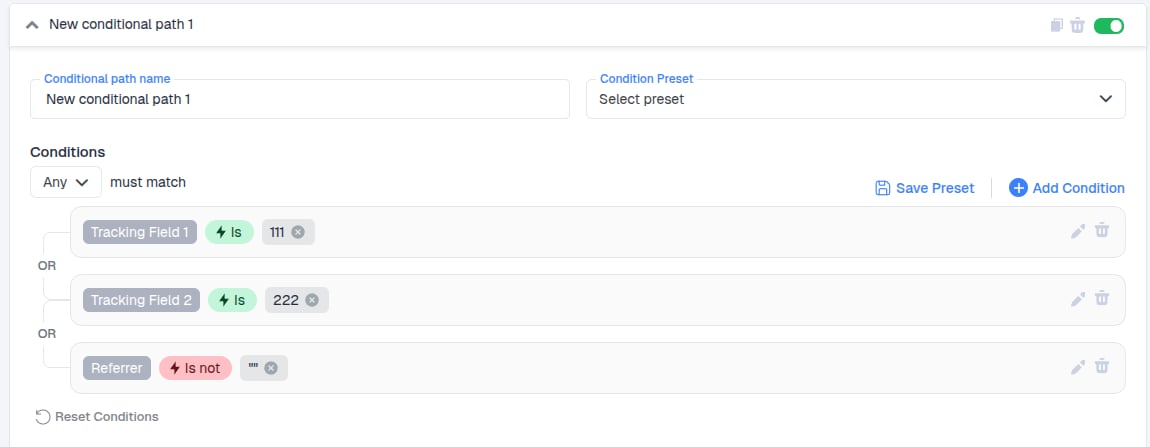
The top-to-bottom order decides which path is checked first. AND/OR logic decides whether a single path matches:- AND: the visit must meet all conditions of the path.
- OR: the visit must meet at least one condition of the path.
Name Your Conditional Path
Start by giving your conditional path a clear name. Descriptive names (e.g. “US – Mobile”) make it easier to check the evaluation order at a glance.Set Conditions
Next, define the conditions. You can choose from pre-existing conditions or create a new one on the spot.Note: You can modify existing conditions.
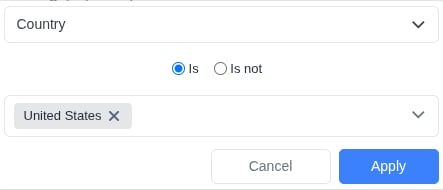
- Select a condition type from the list (e.g., Country)
- Choose the operator (is / is not)
- Specify the allowed or blocked value (e.g., United States)
-
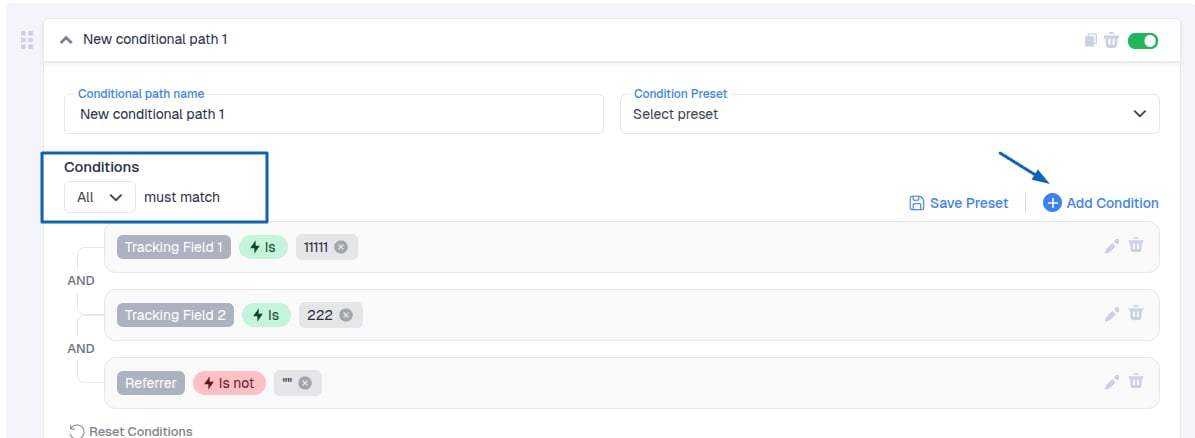
Choose how the conditions are evaluated using AND or OR logic.
AND: All conditions must be true for the path to be followed and the redirection to occur.
-
Click Apply to confirm. For example, if you choose Country - Is not - United States, this path will not receive traffic from the U.S.
- Create the Path
- Give the path a name
- Select the Path Destination and the Transition to Offer
Traffic Distribution
Traffic distribution is controlled by weight values. The weight proportion determines the percentage of traffic each path receives. The total always sums to 100%. Weights only come into play after a visit has been routed. First, the top-to-bottom check decides which conditional path (or the default path) the visit goes to. Then, the weights split that traffic between the paths inside it. Important Notes:- Every Flow must include at least one default path.
- Each default path must contain at least one item.
- Conditional paths are evaluated top to bottom, and the first match wins.
- Visits that match no conditional path always go to the default path(s).